

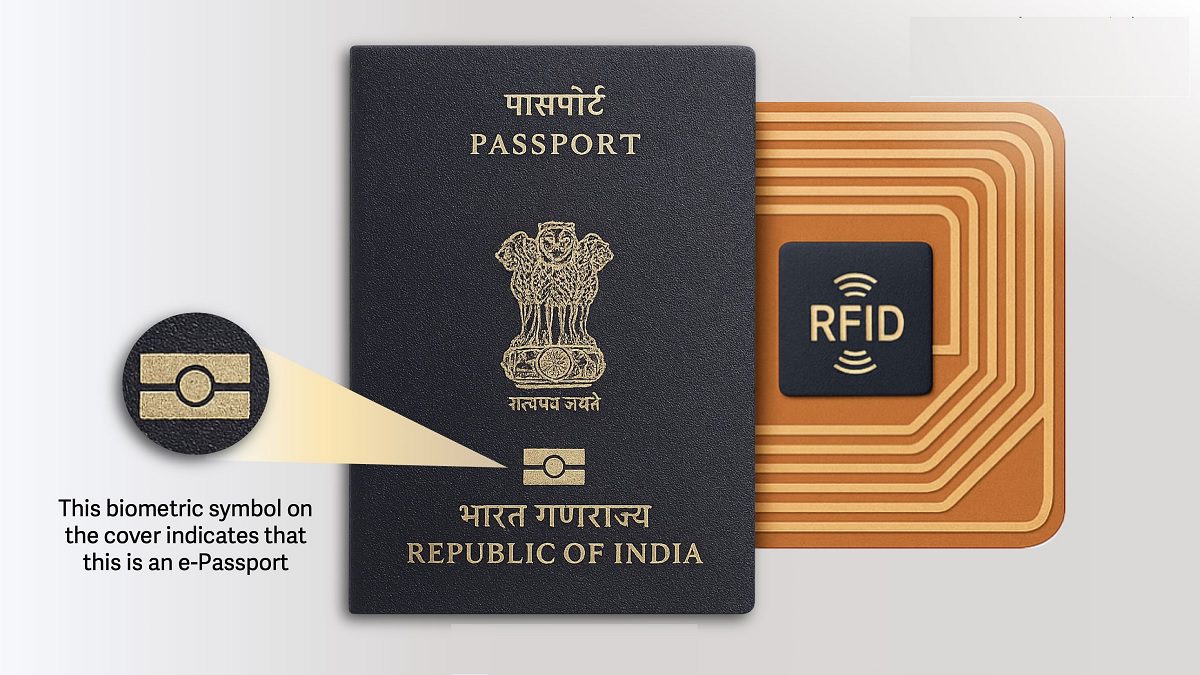
Here’s everything you need to know before you apply for a passport in India or renew your old one
Add informalnewz.com as a Preferred Source


New E-Passport: If you’ve been delaying your passport renewal, this is your sign to finally get it done. Under the upgraded Passport Seva Programme (PSP V2.0), the country has rolled out chip-enabled e-passports across all Passport Offices, Passport Seva Kendras, Post Office Passport Kendras, and Indian missions abroad.
And no, you don’t have to click a separate box or opt into any special scheme. Every new or renewed passport is now an e-passport by default.
What Is An e-Passport?
From the outside, almost nothing changes, except a tiny gold symbol on the cover. Inside, though, the passport gets a tech upgrade. A secure RFID chip and antenna are embedded in the document, storing your personal and biometric details in a digitally signed format. This makes the passport compatible with global e-verification systems, reduces identity fraud, speeds up immigration queues, and enhances overall security.
Do You Need To Replace Your Current Passport?
Not at all. Your existing passport stays valid until it expires or runs out of pages. When you apply for renewal in the future—whether at a PSK, a post office centre or an embassy abroad—you’ll automatically receive the new chip-enabled version.
PSP V2.0 isn’t just about the chip. The website and app have been redesigned with friendlier features:
Auto-filled forms
Easier document uploads
UPI & QR code payments
AI-powered chat and voice bots to assist applicants
Whether you’re applying fresh or renewing, the process is now smoother than ever.
How To Apply For A Passport In India
1. Register On The Passport Seva Portal
Create an account on the Passport Seva Online Portal by selecting New User Registration. Enter basic details like name, date of birth and email ID.
2. Fill Out The Application Form
Log in and choose Apply for Fresh Passport/Re-issue of Passport. Complete the form carefully and review everything before submitting.
3. Pay The Fee
Click Pay and Schedule Appointment, pick your preferred Passport Seva Kendra (PSK) or Post Office Passport Seva Kendra (POPSK), and make the payment online.
4. Book An Appointment
Choose a suitable date and time. Download and save the application receipt because it will be checked at the centre.
5. Visit The PSK/POPSK
Carry all original documents along with self-attested photocopies. At the centre, your documents will be verified, your biometrics will be recorded, and you may be briefly interviewed.
6. Wait For Police Verification
Depending on your application type and address, a police verification may be required. Stay available at your residence and keep any additional documents ready.
7. Track Your Application
On the Passport Seva Portal, use your file number and date of birth to check real-time updates. Once approved, your passport is dispatched to your registered address.
Documents Required for an e-Passport
Bring original documents plus self-attested copies.
Proof of Address (any one):
Aadhaar Card
Voter ID
Electricity/Water/Telephone Bill
Bank Statement
Rental Agreement
Proof of Date of Birth (any one):
Birth Certificate
School Leaving Certificate
PAN Card
Aadhaar Card
Identity Proof:
PAN Card
Aadhaar Card
Voter ID
Additional Documents (if applicable):
Marriage certificate (for name change)
Address proof in parent’s name for minors
Divorce decree, adoption papers, or police report (in case of lost/stolen passport)
How Much Does A Passport Cost?
Adults (18+):
36-page booklet: ₹1,500 (Normal) | ₹3,500 (Tatkal)
60-page booklet: ₹2,000 (Normal) | ₹4,000 (Tatkal)
Minors:
36-page booklet: ₹1,000 (Normal) | ₹3,000 (Tatkal)

